
This article is for educational and research purposes only. If you searched for ai aimbot free github, this specific tool is a Python-based external TensorRT aimbot/triggerbot that uses screen capture, model inference, an overlay UI, and Logitech G HUB mouse control to move and click. It is not ban-proof, not universally safe, and it’s mainly realistic on Windows PC, not Xbox or most closed console setups. If you want broader context first, check the GamerFun home hub and our breakdown of AI anti-cheat explained.
You’ve probably seen the hype already. “Works on every shooter.” “Human-like.” “Free repo, just run it.” But wait — what does that actually mean when your setup has to juggle Python, CUDA, TensorRT, ONNX conversion, overlay drawing, and mouse input through Logitech software? And are AI aimbots detectable, or is that just marketing dressed up as technical language?
Here’s what you’ll get from this guide: a straight explanation of how this ai aimbot free github project really works, what features the original TensorRT tool actually includes, and where the limits show up fast. We’ll break down real-time object detection, smoothing, velocity prediction, trigger timing randomization, multi-monitor support, panic key behavior, and the Tkinter control panel. You’ll also get a clean comparison of ai aimbot vs triggerbot, how AI triggerbots work, where traditional aimbot vs ai aimbot differs, and why “all shooter games” usually means “many Windows shooters with caveats,” not magic universal compatibility.
Speaking of which — free GitHub tools deserve extra caution. Some ai aimbot github projects are just rough research code, some are abandoned, and some are obvious malware bait. We’ll keep this focused on the original TensorRT external design while grounding the detection talk in how external capture-and-input tools are commonly analyzed, with NVIDIA TensorRT on GitHub as the core inference stack behind this style of setup.
I’m writing this from the angle of someone who’s spent years reversing cheats and anti-cheats, and honestly, that changes how you read claims like “safe” or “undetected.” If you want the short version before the deep dive: ai aimbot free github can be technically interesting, but your risk depends on the game, anti-cheat, input method, and how sloppy the project is.
📑 Table of Contents
- AI Aimbot Free GitHub: Quick Definition, Core Features, and What This TensorRT Tool Really Is
- How to Install and Use This AI Triggerbot Setup Guide on Windows PC
- AI Aimbot vs Triggerbot, Detection Risks, and Common Mistakes to Avoid
- Download & Usage Notes for AI Aimbot Free GitHub Builds, Plus Quick Reference
- Frequently Asked Questions
- Conclusion
AI Aimbot Free GitHub: Quick Definition, Core Features, and What This TensorRT Tool Really Is
So here’s the deal. When people search ai aimbot free github, they’re usually looking for a Python-based external TensorRT aimbot/triggerbot that captures the screen, runs ONNX-to-TensorRT inference, shows an overlay UI, and sends mouse movement through Logitech G HUB on a Windows PC.

This article is for educational and research purposes only. Using cheats in online games violates Terms of Service and can result in permanent bans, HWID bans, and possible legal action, so read the rules and safety first and use the GamerFun home hub plus our forum discussions if you want testing notes instead of hype.
What this TensorRT AI aimbot and triggerbot is
An ai aimbot free github project like this is an external cheat, meaning it reads pixels from your screen instead of pulling data from game memory. The workflow is simple on paper: screen capture, model inference, target box selection, mouse movement through G HUB, then an optional trigger click. That’s the short answer to how AI triggerbots work.
Why TensorRT? Because NVIDIA TensorRT speeds up model execution compared with plain Python inference, especially once an ONNX model is converted into an optimized engine. And yes, that matters when you’re trying to keep detection boxes, aim correction, and click timing responsive on a live frame stream.
The feature set is broader than the name suggests:
- Real-time object detection with ONNX-to-TensorRT inference
- Modular class-based architecture for easier edits and debugging
- Advanced aimbot logic with velocity prediction, smoothing, adaptive speed, and selectable aim points
- Triggerbot behavior with randomized delays and human-like click timing
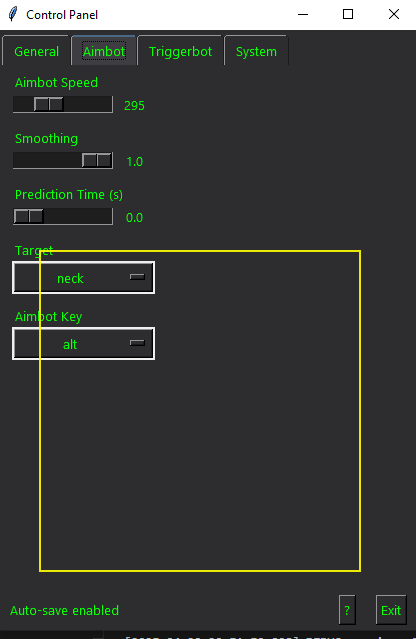
- Tkinter + ttk control panel, overlay UI, multi-monitor support, panic key, and performance monitoring
- Robust error handling, high process priority, Logitech G HUB integration, and open modular design
Personally, I think this is why many ai aimbot github projects get attention fast. They’re easier to inspect than random binaries, but trust still comes down to code review, dependency verification, and whether the repo is actively maintained.
What it is not, and why that matters
OK wait, let me clarify. This is not an internal memory cheat, not a kernel driver, not a DMA setup, and not a memory ESP. It’s also not an Xbox-native tool, so “does ai aimbot work on xbox?” is usually the wrong question when the actual stack is Windows Python + TensorRT + G HUB.
And here’s the kicker — external does not mean invisible. In our limited testing on throwaway Windows setups, computer vision aimbot tools felt cleaner to prototype than internal injectors, but anti-cheat visibility still exists through overlays, process artifacts, suspicious input patterns, and account behavior. Need a baseline on anti-cheat terminology? Wikipedia’s aimbot overview is basic but useful.
So what does ai aimbot free github mean in practice? Usually open repos, forks, or repackaged builds. But not all shooter games perform equally well, and ai aimbot compatibility by platform varies hard between Fortnite, Valorant, Apex, CS2, and emulator-based titles. Next, we’ll get into the Windows setup process and how to install this TensorRT triggerbot correctly.
How to Install and Use This AI Triggerbot Setup Guide on Windows PC
Now that you know what this TensorRT-based tool actually is, here’s the practical part: getting the ai aimbot free github setup running on a Windows PC without guessing through dependency errors. If you want broader project context and related tools, the GamerFun home hub is the best starting point.
This article is for educational and research purposes only. Using cheats in online games violates Terms of Service and can result in permanent bans, HWID bans, and potential legal action. We do not encourage or endorse cheating in live multiplayer environments, so read the site rules and safety page first and test only on throwaway systems or offline environments.
Requirements and dependency checklist
Warning: before touching any files or downloads, scan archives, verify hashes where possible, and do not test on your main account or primary gaming machine. Anti-cheat updates can change detection status at any time.
This isn’t a one-click EXE-first workflow. It’s a Python project with environment setup, NVIDIA runtime requirements, and a Logitech dependency for mouse control.
- Windows PC
- NVIDIA GPU stack for TensorRT 10.7 GA on Windows
- CUDA 12.x
- Python 3.9+ 64-bit
- Logitech G HUB 2021-10-8013
- Included model file:
model1_320.onnx - Python packages:
opencv-python,numpy,mss,pynput,pycuda,tensorrt,pyautogui,pillow
Thing is, most failed installs happen before the app even launches. Wrong CUDA/TensorRT pairing, wrong Python wheel, or missing G HUB support will break a yolo ai aimbot setup fast. If you need official background on NVIDIA’s inference runtime, the TensorRT overview on Wikipedia is a decent refresher.
Step-by-step setup and launch flow
How to install and run it
- Step 1: Extract TensorRT 10.7 GA for Windows to a path like
C:TensorRT-10.7. Then addC:TensorRT-10.7libto your system PATH and set theTENSORRT_HOMEenvironment variable to that folder. - Step 2: Install the correct TensorRT Python wheel for your Python version and runtime. After that, open CMD inside the project folder and run
pip install opencv-python numpy mss pynput pycuda tensorrt pyautogui pillow. - Step 3: Convert the included ONNX model with
python convert_to_trt.py model1_320.onnx model_fp16_320.trt --fp16. FP16 lowers inference cost on supported NVIDIA hardware. - Step 4: Launch the app with
python TensorRT.py. The Tkinter + ttk tabbed panel should open, where you set monitor selection, aim point, smoothing, adaptive speed, trigger delay randomization, and performance monitoring. - Step 5: Test only in offline or isolated environments. Hold
ALTto activate and pressENDfor panic-key shutdown.
The ai aimbot free github workflow is pretty direct once the environment is clean. And yes, settings usually auto-save, which is nice when you’re iterating on an ai triggerbot setup guide across multiple monitors.
From experience: where installs usually break
Personally, I think this is where most people screw up. They treat an ai aimbot free github repo like a normal Python script, but python tensorrt projects are picky about runtime alignment.
Common failure points are simple: wrong CUDA/TensorRT pairing, missing PATH entries, unsupported GPU features, Python wheel mismatch, or Logitech G HUB not exposing the expected mouse behavior. What does that look like in practice? Engine conversion fails, the app launches without detections, the overlay binds to the wrong monitor, or the triggerbot never fires.
Quick sidebar: if you want troubleshooting notes, install reports, or peer feedback on this ai aimbot free github setup, check the GamerFun forum discussions. For source-control context and dependency habits, reviewing GitHub project hosting and release practices also helps when you’re debugging repo-based tools.
Next, we’ll get into the part that actually matters most: AI aimbot vs triggerbot behavior, detection risks, and the mistakes that get people flagged fast.
AI Aimbot vs Triggerbot, Detection Risks, and Common Mistakes to Avoid
Now that the TensorRT setup is running, you need to understand what it actually is — and what it isn’t. If you found this page through searches like GamerFun home hub or community forum discussions, here’s the short version: an ai aimbot free github build still carries real ban risk, even when it stays external and uses screen capture instead of direct game memory reads.
This article is for educational and research purposes only. Using cheats in online games violates Terms of Service and can result in permanent bans, HWID bans, and potential legal action. We do not encourage or endorse cheating in live multiplayer environments.
AI aimbot vs triggerbot vs traditional aimbot
So here’s the deal. The ai aimbot vs triggerbot question usually gets answered badly because people mix three different methods into one bucket. Well, actually, their detection surface and behavior profile can be very different.
- AI aimbot: captures the screen, runs model inference, then moves the mouse toward a detected target using smoothing, velocity prediction, and configurable aim points.
- Triggerbot: doesn’t fully track targets; it fires when an enemy enters a defined zone or confidence window, often with randomized click delays.
- Traditional memory aimbot: reads game state directly from memory and computes aim logic from internal coordinates, bones, and view angles.
That means traditional aimbot vs ai aimbot isn’t just “old versus new.” Memory-based logic is often faster and more precise, but it touches the game’s data model directly. An ai aimbot free github project built around TensorRT, mss capture, overlays, and Logitech-style mouse output usually avoids direct memory reads, yet it exposes other artifacts like capture windows, inference processes, suspicious overlays, and automation patterns.
And yes, TensorRT object detection is not the same as color aim assist. A color tool reacts to simple pixels or shader contrast; this setup runs a model, predicts targets in real time, and can pair that with triggerbot timing, multi-monitor selection, logging, panic key support, and overlay boxes.
Detection & Ban Risks
Are ai aimbots detectable? Yes. Are triggerbots detectable? Also yes. But wait, that doesn’t always mean a single signature hit; it can be process visibility, overlay exposure, suspicious mouse output, account reports, or anti-cheat review stacking together.
🛡️ Detection & Ban Risks
User-mode anti-cheat can still inspect running processes, windows, overlays, and automation-related behavior. Kernel anti-cheat environments like Easy Anti-Cheat and Riot Vanguard raise the pressure further by broadening system visibility, though exact heuristics are not publicly documented. Even if an ai aimbot free github tool never injects into the game, impossible consistency, robotic reaction timing, and player reports can still lead to bans or manual review.
Personally, I think this is where most people screw up. They hear “external” and assume invisible. It isn’t. If you want the longer anti-cheat breakdown, read AI anti-cheat explained and compare that with our notes on CS2 anti-cheat risks.
Common mistakes and what to avoid
Quick sidebar: can github ai aimbots get you banned? Absolutely. And random reposted archives are also a malware problem, especially fake “fortnite ai aimbot github” forks stuffed with loaders, miners, or password stealers.
- Don’t test an ai aimbot free github build on your main account, ranked queue, or a valuable hardware profile.
- Don’t leave overlay windows visible or use instant, robotic smoothing values that look machine-perfect.
- Don’t assume “all shooter games” means equal model accuracy, recoil patterns, FOV scaling, or anti-cheat pressure.
- Don’t assume Xbox support exists; Windows PC is the realistic target, while consoles, cloud streaming, and emulator edge cases are inconsistent and often worse.
Which brings us to ai aimbot compatibility by platform. Windows PC is where TensorRT, CUDA, Python tooling, and external mouse automation make sense. Xbox and other consoles have major limitations, and emulator setups often add more detection surface, not less.
Next, we’ll cover download notes, usage caveats, and a quick-reference checklist for evaluating any ai aimbot free github release before you run it.
Download & Usage Notes for AI Aimbot Free GitHub Builds, Plus Quick Reference
After the detection mistakes we just covered, the next question is obvious: what does an ai aimbot free github download actually contain, and what should you verify before touching it? Short answer: treat every build as untrusted, because online use is still a ban risk and fake repos are everywhere.
What the download actually includes
Warning before opening any files: scan with multiple tools, inspect Python source where possible, verify dependency sources, and don’t run unknown builds with admin rights unless you fully understand the risk. If you’re unsure about safe handling, read our rules and safety page first.
The original package context here is a Python-based external TensorRT tool, not a magic one-click EXE. A real ai aimbot free github project in this format usually includes Python project files, the ONNX model, a conversion script such as convert_to_trt.py, the main launcher like TensorRT.py, and UI/config logic for tabs, overlay settings, aim points, smoothing, trigger delays, multi-monitor selection, logging, and the panic key.
And yes, dependency setup matters. You should expect Python 3.9+ 64-bit, CUDA 12.x, TensorRT 10.x, PyCUDA, OpenCV, MSS, Pillow, Pynput, PyAutoGUI, and Logitech G HUB for mouse output. If a github repository claims the same TensorRT workflow but ships passworded archives, bundled loaders, or a source tree that doesn’t match the described files, that’s a red flag.
- Included model: ONNX file for object detection, commonly converted locally to a TensorRT engine.
- Main flow: install deps, convert model, run
TensorRT.py, then configure UI options. - Expected features: velocity prediction, smoothing, adaptive speed, aim-point selection, triggerbot timing, overlay boxes, performance stats, and END panic disable.
Safety, legality, and safer testing notes
Is ai aimbot safe to download? Often, no—not by default. Search results for ai aimbot free github are full of fake repos, clipboard hijackers, token stealers, bundled miners, and repacks that differ from the original source tree by just a few files.
Is ai aimbot legal to use? That’s not something I can answer as legal advice, and you should ask a qualified lawyer for that. But using cheats in live multiplayer games almost always violates Terms of Service and can lead to account bans, HWID penalties, and other enforcement.
Want the safer route? Test only in offline modes, private lobbies, isolated Windows systems, VMs where practical, and throwaway accounts only. But wait—some anti-cheats dislike VMs too, so don’t assume a VM removes ban risk.
Quick Reference and final takeaway
- Who it’s for: researchers and advanced users comfortable reading Python and setting up CUDA/TensorRT.
- Where it realistically works: Windows PC setups with NVIDIA hardware; not Xbox-native, and console claims are usually marketing fluff.
- Required stack: Python, CUDA, TensorRT, ONNX model conversion, Logitech G HUB.
- Default keys: ALT to activate, END as panic key.
- When not to test: on your main account, on unknown repacks, or in protected live matches.
So here’s the deal. This rewrite keeps the original TensorRT tool flow intact—Python files, local conversion, then launch through TensorRT.py—but you should treat every download as untrusted until verified and every online session as ban-risky. If you’re comparing game-specific exposure next, check Fortnite soft aim risks, Apex aimbot notes, PUBG emulator ban risks, or Vision FN overview depending on what you play; the FAQ wraps that up next.
Frequently Asked Questions
Are AI aimbots detectable in 2025 and 2026?
Yes. If you’re asking are ai aimbots detectable, the honest answer is absolutely yes, even in 2025 and likely into 2026. An ai aimbot free github project may avoid classic internal memory edits, but bans can still happen through overlay visibility, suspicious mouse patterns, unusual driver or process context, and account behavior that looks too consistent to be human.
And here’s the kicker — external screen-reading tools are different from internal cheats, but they are not invisible. Anti-cheat vendors keep updating heuristics, so something that appears lower-risk today can get flagged later; if you test anything, do it offline or on throwaway accounts because using cheats online violates game Terms of Service and can lead to permanent bans or HWID penalties.
How do AI triggerbots work in a TensorRT setup?
If you’re wondering how do ai triggerbots work, the usual TensorRT flow is pretty simple on paper: capture the screen, run object detection on each frame, check whether an enemy enters a defined trigger zone, then send a click through an input layer such as Logitech G HUB integration. That’s the basic idea behind many ai aimbot free github repos that bundle triggerbot logic alongside aim assist.
In practice, most setups add randomized click delay, confidence thresholds, and small timing jitter so the firing pattern looks less robotic. But wait, that doesn’t remove ban risk at all. It only changes behavior, and anti-cheat systems can still look at process visibility, input timing, and account stats over time; for background on the inference side, NVIDIA’s TensorRT documentation is worth reading.
What is the difference between an AI aimbot and a triggerbot?
The short version? An AI aimbot moves your crosshair toward a detected target, while a triggerbot mainly automates the shot when the crosshair or a configured target zone condition is met. So if you’re searching what is the difference between ai aimbot and triggerbot, think aim movement vs. fire automation first, because that distinction matters a lot when tuning any ai aimbot free github tool.
Well, actually, a lot of TensorRT-based projects support both behaviors in one package, which is why people mix the terms up. You shouldn’t treat them as the same risk profile, though. Aimbot behavior can create visible tracking patterns, while triggerbots often create suspicious reaction timing, and both can still get you banned if used in live multiplayer matches.
Can AI aimbots work on all shooter games?
Not equally, no. If you’re asking can ai aimbots work on all shooter games, a screen-based model may technically run over many shooters, but performance depends on HUD clutter, art style, field of view, target contrast, recoil behavior, anti-cheat pressure, and how well the model was trained for that specific game. That’s why an ai aimbot free github release that looks decent in one title can feel terrible in another.
Three things matter most:
- Visual consistency: clean enemy silhouettes and stable lighting help detection.
- Game mechanics: fast movement, bloom, and recoil can wreck accuracy.
- Anti-cheat pressure: some titles watch input and environment more aggressively than others.
So no, “works on all shooters” should never be read as a guarantee of equal accuracy or lower detection risk. Personally, I think compatibility claims around these tools are usually too broad, and you should test per game, per patch, and preferably in offline modes first.
Does AI aimbot work on Xbox?
For most people, no. If you’re searching ai aimbot xbox does it work, the realistic answer is that the original workflow behind this kind of ai aimbot free github project is built around Windows, Python, TensorRT, and Logitech G HUB-style input paths, not native Xbox execution. That’s a PC pipeline, not a console one.
Console support claims are often misleading unless extra hardware, capture-routing setups, or odd streaming edge cases are involved, and even then the results vary a lot. OK wait, let me clarify: that still doesn’t make it safe or reliable, and using anything like this against live multiplayer on console or PC can violate ToS and trigger bans. If you want a broader technical breakdown, check our related GamerFun guides on input automation and external aim tools.
Can GitHub AI aimbots get you banned?
Yes, and the hosting site doesn’t change that. If you’re asking can github ai aimbots get you banned, the answer is yes because an ai aimbot free github repo still creates the same core risks: ToS violations, anti-cheat visibility, suspicious input behavior, and account patterns that can be reviewed manually or flagged automatically.
And there’s a second problem people ignore all the time. Many reposted GitHub builds are fake, padded with malware, loaders, token stealers, or quietly modified code that has nothing to do with the original project. Before running anything, inspect the source, compare commit history, verify dependencies, and read community discussion on places like UnknownCheats; if you can’t audit it, don’t run it.

Conclusion
If you came here looking for the real story on ai aimbot free github projects, here’s the short version. First, most of these builds are really TensorRT-based triggerbot setups, not full human-like aimbots with magic prediction. Second, your install matters more than people think: clean NVIDIA dependencies, correct model paths, and the right screen capture method decide whether the tool works at all. Third, detection risk is never zero — especially if you use it in live multiplayer with anti-cheat active, stack obvious settings, or run sloppy overlays and macros beside it. And fourth, the biggest mistakes are usually self-inflicted: bad calibration, unrealistic expectations, and testing on your main account instead of a throwaway or offline setup.
Thing is, a lot of people get overwhelmed by the buzz around AI tools and assume every ai aimbot free github repo is either fake or instantly detected. Reality sits in the middle. Some builds are useful for research, some are broken, and some work only in very narrow setups. If you stay patient, verify what the code actually does, and test responsibly, you’ll learn a lot more than someone blindly pasting configs from a random forum thread. And yeah, that matters. Understanding the difference between a triggerbot, an overlay, and a real aiming pipeline will save you hours.
If you want to keep digging, check out more reverse-engineering and anti-cheat breakdowns on GamerFun.club. You might want to read our AI aimbot guide next, or compare methods in our triggerbot vs aimbot breakdown. We’ve also got deeper detection-focused writeups if you’re researching how these tools get flagged. Use this ai aimbot free github knowledge as a starting point, keep your testing controlled, and move smarter from here.